Every AI tool you have used until now waits for you. You open it, you ask, it answers, you close the tab, and the work is still sitting in your hands. The model talked you through the job. It did not do the job.
Grok Bot inverts that. Each Bot gets its own persistent computer in the cloud, with a browser, a filesystem and a terminal. It signs into the tools you already use, clicks through them the way you would, and keeps going after you shut the laptop. So you stop prompting and start delegating, and the skill that matters changes with it: it is no longer how do I phrase this, it is what exactly am I handing over, and where does its authority stop. That is a management question rather than a prompting one, and it is what the ten steps below are really teaching.
Grok Bot is xAI's agent app, released in early beta on 11 August 2026, at x.ai/bot. It runs on macOS, Windows and iOS, and the same Bots and conversations follow you between them. One account holds up to 50 Bots and group chats combined, which is enough to run a small team of specialists rather than one assistant that does everything badly.
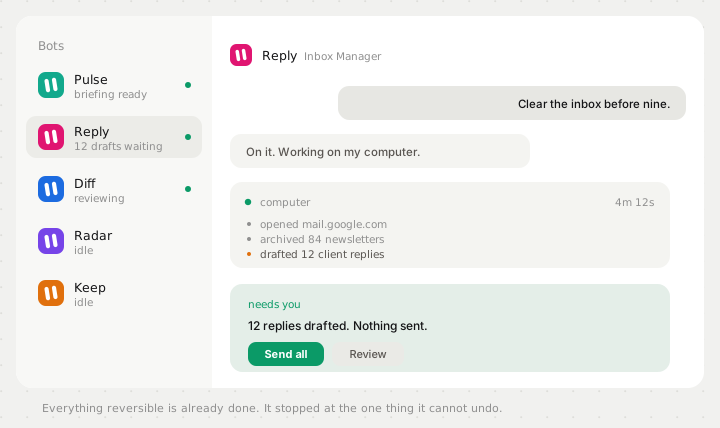
Step 1: start with one Bot and one errand you can check
Install the desktop app, sign in with your Grok account, and you land in a sidebar of Bots on the left and a conversation on the right. Your first Bot is a generalist. Call it the Chief. Its job is not to do everything. Its job is to be the one you message when you do not yet know which specialist should own the task, and later, to route work to the others.
Give it something small and real. Not a test question, an actual errand with a result you can verify in thirty seconds. Find the pricing page of these four competitors and tell me what each one charges for the cheapest paid plan. You are not measuring whether the model is clever. You are measuring whether it went and looked, and whether what came back is true, because the next nine steps are all about trusting it with progressively larger jobs.
Step 2: write a job, not a prompt
This is the step that separates people who get value out of Grok Bot from people who bounce off it. A prompt is a request that lasts one message. A Bot is a role: it persists, it keeps its instructions, it owns a domain, and it gets better at that domain specifically because you keep coming back to the same thread.
So name it after a job a person could actually hold. Inbox Manager. Expense Manager. Talent Scout. Sales Outbound. Then open Bot actions, then Edit Profile, and write the description the way you would brief a new hire on their first day: what it owns, what good looks like, and the part almost everybody skips, what it must never do without asking you.
You are my Inbox Manager.

what you own
  Triage my email every morning. Archive newsletters and receipts.
  Draft replies to anything a client sends. Surface anything that
  mentions a deadline, an invoice or a legal question.

what good looks like
  Inbox at zero by 9am. Drafts sound like me: short, direct, never
  more than four sentences, and never "I hope this finds you well".

where you stop
  Never send anything. Draft only.
  Never archive anything from my accountant or my landlord.
  If a message asks for money or credentials, stop and ask me.
That last block is not paperwork. A Bot with its own computer and your logins can act while you are asleep, so writing down where its authority stops is what makes the always on part usable at all. Bots that have to ask about everything are useless. Bots that never ask are dangerous. The description is where you draw that line once instead of worrying about it daily. If you want the longer version of what belongs in that field, the guide to writing Grok Bot instructions covers the five things that reliably change the output, and every one of our 51 Grok Bot templates publishes the rules it carries so you can read a finished one before writing your own.
Step 3: connect the tools once, at the account level
Under Settings, then Plugins, you will find the connectors Grok Bot expects you to lean on: Slack, GitHub, Notion, Google Workspace and the rest. The detail worth knowing is that a connection belongs to your account rather than to one Bot. Connect Gmail once for your Inbox Manager and every Bot you create afterwards can reach it, which is why the fifth Bot you hire is productive in seconds rather than minutes.
The same fact is the reason to be deliberate. If one connection is available to every Bot you will ever create, then the blast radius of connecting something is larger than the Bot you connected it for. Connect what the work actually needs and leave the rest alone, particularly during a beta.
Step 4: hand over the login, never the password
Most of the software inside a real company has no API and no connector. This is the mechanic that makes Grok Bot work on it anyway. The Bot navigates on its own cloud browser until it hits a login wall, then hands you the screen. You authenticate, you click done, and the Bot picks up on the same browser session from exactly where it stopped.
Watch what that does to the trust model. You never type a credential into a chat message. The Bot ends up with a session, not a secret, and you stayed in the loop for precisely the sensitive part. Treat this as the pattern to insist on: if anything ever asks you to paste a password into a conversation, that is the wrong path, whatever is asking.
Step 5: show it once instead of describing it twice
Teach a task lets you demonstrate a workflow on the Bot's computer while it watches, for up to ten minutes. It keeps the steps, the decision rules, the expected output and the boundaries as a skill, and skills are available across all your Bots rather than trapped in the one that learned it.
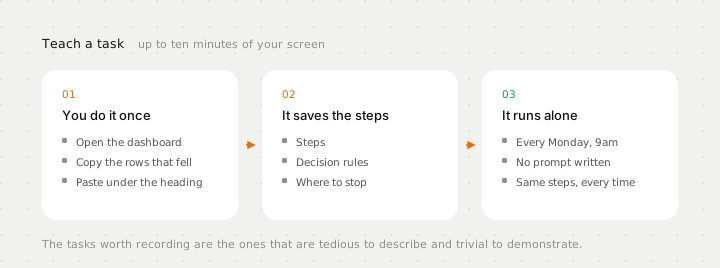
This matters more than it sounds, because the tasks that eat your week are usually the ones that are tedious to describe and trivial to demonstrate. Take the numbers from this dashboard, cross reference the ones that dropped, paste them into the doc under the right heading, and post in the channel if anything fell more than fifteen percent is a paragraph to write and forty seconds to show.
Pick the first recording carefully. The best candidate does three things at once: you do it at least weekly, it touches two or more tools, and the steps rarely change. Recurring, multi tool, stable. Anything that clears all three is a routine waiting to be lifted off your desk.
Step 6: turn the good run into a routine
A saved skill still needs a reason to fire, and Grok Bot gives you two. You set them by asking, in a sentence, at the end of a task you already liked. There is no canvas of nodes to assemble.
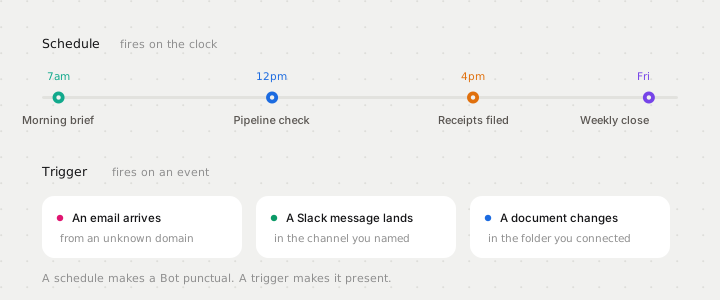
the morning brief, on a schedule
  Every weekday at 7am, check my calendar, my inbox and the
  launches channel. One short brief: what is on today, what
  needs a reply, what changed overnight. If nothing changed,
  say so in one line rather than filling the template.

the inbound catcher, on a trigger
  Whenever an email arrives from a domain not in my contacts
  and it mentions pricing, draft a reply from the template
  and park it for me.

the shortcut that creates most routines
  Run this every week.
     said straight after a run you liked. That is the whole flow.
Scope it tighter than feels necessary. An agent that wakes every fifteen minutes to discover nothing has changed is paying to learn what a schedule already knew, and business hours beat always on almost every time. The guide to Grok Bot routines goes through the three things that have to be true before a job is ready to be scheduled at all, and the four worth running every morning.
Step 7: hire specialists, not one generalist
You can run many Bots in parallel, each owning a different area, and this is where the product stops resembling anything you have used before. Separate Bots mean separate memory, separate context and separate accountability.
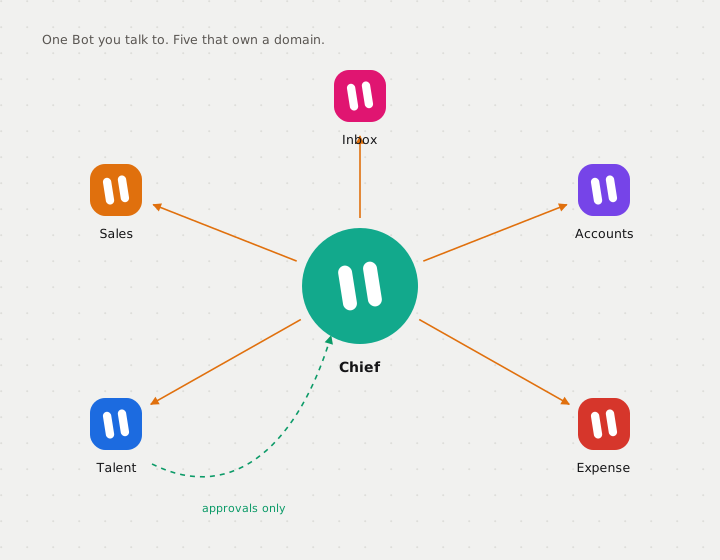
An expenses Bot that only ever thinks about receipts gets genuinely good at your receipts. A generalist juggling expenses, recruiting and outbound is worse at all three, and when something goes wrong there is no clean thread to read. Split by domain rather than by task size, and use the same one sentence test the guide to creating a Grok Bot uses: if you cannot say what it does without the word and, it is two Bots.
A workable first roster for one person is five. Take them from templates rather than a blank field, because reading a long description written by somebody who has done the job is faster than writing one: Pulse for the morning briefing, Reply for the inbox, Claim for expenses, Radar for competitors and Keep for follow ups. If you build software, swap two of those for Diff and Mon. Forty of the fifty one install in one click.
Split by domain and you land on roughly the nine we publish for, because they are the nine most people split along anyway: design, marketing, growth, sales, engineering, product, support, hiring and operations Grok Bots. Start with the two that map to where your week actually goes, and add the rest when a job comes up rather than in advance.
Step 8: put two to six of them in a group chat
Bots can message each other and share context in a thread. Put between two and six in a group chat and they coordinate on their own, passing work, assigning ownership and pulling you in only for the calls that need a person. When two projects overlap they stay aligned in the same place, instead of you copying notes between conversations.
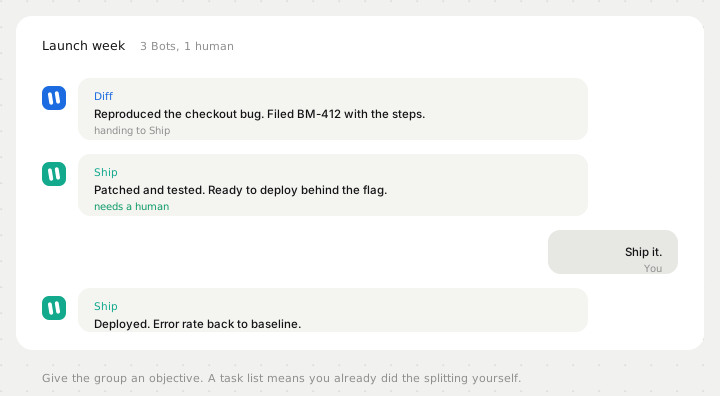
The way to make a group work is to give it an objective rather than a task list. A task list means you already did the decomposition and the Bots are just executing your plan, which is the one job a single Bot could have done. An objective lets them split it, and splitting it is the entire reason to have more than one.
Step 9: draw the approval line on reversibility, not on size
Grok Bot's whole premise is that a Bot finishes a job end to end and comes back only when something needs approving. That puts the burden on you to define what needs approving, because the default answer it picks may not match yours. Sending, purchasing, deleting, publishing and changing production systems all require approval out of the box, and customer contact always does.
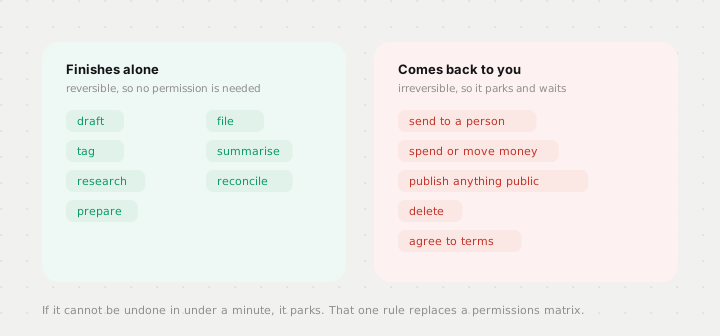
finish these alone, always
  draft, file, tag, summarise, research, prepare, reconcile.
  everything reversible. do not ask, do it and log it.

park these for me, always
  send anything to a person outside the company
  spend or move money, or commit to a price
  publish anything public
  delete anything that is not obvious junk
  sign up for, agree to or accept any terms

when unsure
  If you cannot undo it in under a minute, park it and ask.
That single sentence at the bottom replaces a permissions matrix, and it is why an inbox Bot that queues thirty six drafts and sends zero of them is the correct shape rather than a half finished one. Every Bot we publish that touches an inbox, a pipeline or a customer drafts and stops, including Reply, Hunt and Desk, and that boundary is written into the description rather than left to the schedule to enforce.
Step 10: read the run log every week and delete what nobody opens
Automation rots quietly. A site changes its layout, a routine starts producing nonsense, and because the Bot runs while you sleep nobody notices for three weeks. This is the failure mode of every always on system ever built and it will find you here too. Grok Bot keeps the last twenty run records for each routine, which is exactly what a weekly review needs.
Put fifteen minutes in the calendar. For each routine, three questions: did it run, was the output actually right, and would you miss it if you killed it. The third one matters more than it looks, because the natural drift of a tool like this is towards a pile of half useful automations nobody has the nerve to delete. The fastest way to run the review is to ask the Bots for it, since they keep the threads and can report on themselves.
List every routine you ran this week. For each one:

  how many times it fired
  what it produced
  anything it skipped, failed or had to guess at
  anything you parked for me that I never answered

Then tell me which one you think is least useful, and why.
Then spot check one output per routine by hand, because a Bot reporting on its own work has the same blind spot you do. The line to watch is the last one: parked items nobody answered. A queue of unanswered approvals means you drew the line in the wrong place, and the fix is in the description rather than in the schedule.
What actually changes
You stop being the one who does the clicking. Every AI product until now put the model in a window and left the work on your side of the screen. Grok Bot moves the work: the Bot has the computer, the logins, the memory and the time, and you keep the decisions. That is a smaller change in technology than it sounds and a much larger one in habit.
If you are still deciding whether this is the right tool at all, Grok Bot compared with ChatGPT Work and Claude Cowork covers where each one is genuinely different rather than differently marketed.
Where the work lands
A Bot that designs, writes or reviews something is producing work that ends up in a codebase, so the last mile is whichever tool you build in. The design templates for those tools come under the same licence as the Bots, which means the agent and the screens it produces come from one place: Lovable, Bolt, Replit, Claude Code, ChatGPT Codex and Cursor.