Site projects dashboard template for SaaS
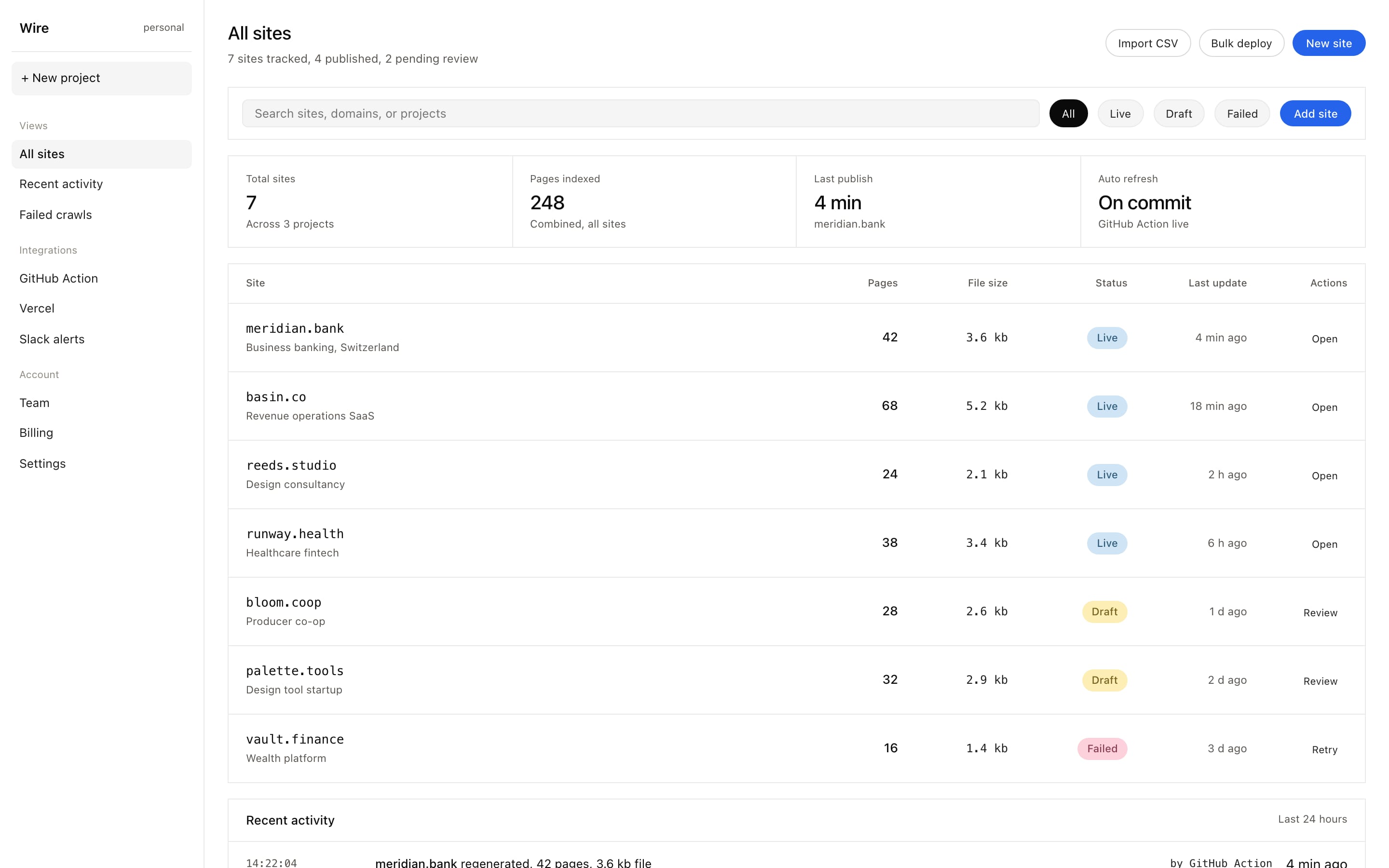
Site projects dashboard template for SaaS tools managing multiple websites or domains. The page shows four stat cards, a sites table with domain names and metrics, and a recent activity log. Developers building multiple site management tools use this template with Claude Code, Replit, Lovable, ChatGPT Codex, Bolt, Cursor, or another coding tool.
More from the AEO monitoring set 6 matching pages

What is included in this AEO template
Site projects dashboard template for the portfolio or workspace overview screen of a SaaS multiple site management tool. The top section shows four stat cards summarizing totals: sites tracked, pages indexed, citations found, and prompts covered. The main content area is a sites table with rows for each domain, showing site name, URL, indexing status, citation count, last crawl date, and a health indicator chip. A recent activity log below the table shows the latest events: new citations, crawl completions, and alert triggers. It uses a light theme. Minimal design with a chat UI. Point a coding tool at it with your brand and your offer, and ask for the matching pages once the design is set.
Build a full SaaS app or admin dashboard with Lovable, Cursor, or Claude Code
A SaaS app or admin dashboard spans dozens of analytics and workflow screens sharing one shell, so one dashboard template anchors the navigation, cards, and UI components on every screen that follows. Copy this template, paste it into Lovable, Bolt, Cursor, Claude Code, Replit, ChatGPT Codex, Google Antigravity, or any AI coding tool, and send this prompt with it.
Paste into Lovable, Bolt, Cursor, Claude Code, Codex, Antigravity, or any AI coding tool
DESIGN.md file for Claude Code, Cursor, and Lovable
The colors, typography, and UI components of this template as a DESIGN.md file, the open format AI coding tools read. Drop it in your project root and point Claude Code, Cursor, Lovable, Bolt, Codex, Antigravity, or any AI coding tool to it, or import it into Google Stitch.
DESIGN.md--- version: alpha name: "Site projects dashboard" colors: primary: "#004FFF" on-primary: "#FFFFFF" neutral: "#FFFFFF" on-surface: "#0A0A0A" on-surface-muted: "#5A5550" surface: "#F5F5F5" secondary: "#003ACC"
Not sure this template fits?Ask Mon, your free AI designer.
Ask Mon, our free AI designer, how to adapt Site projects dashboard template for SaaS for higher signups, free trials, and sales.
3D launch videos, mockups, and conversion guides
Questions about this AEO template
What is a site projects dashboard template?
An overview screen for SaaS tools that manage multiple websites or domains. It shows summary stats at the top, a detailed sites table in the middle, and a recent activity feed at the bottom.
What does the sites table include?
Domain name, URL, indexing status (active, paused, error), citation count, last crawl timestamp, and a health chip for each site. The table supports sorting by any column.
What does the recent activity log show?
A chronological list of events across all sites: new AI citation detected, crawl completed, alert triggered, new page indexed. Each event shows the site name, event type, and timestamp.
Which tools work with this site projects dashboard template?
Claude Code, Replit, Lovable, ChatGPT Codex, Bolt, and Cursor. Paste it in and describe your tool's site schema, metrics, and activity event types to build a complete projects dashboard.
Can I use this template commercially for client projects or SaaS products?
Yes. A one-time BrowserMoon license ($349) unlocks all 730+ website and mobile app UI templates for unlimited personal, commercial, and client projects, including their animations, visuals, and gradients. It is lifetime access with no subscription, no attribution required, and no per-project fee. You cannot resell or redistribute the templates as a template pack. See the template license.


