AI writing dashboard template for SaaS docs
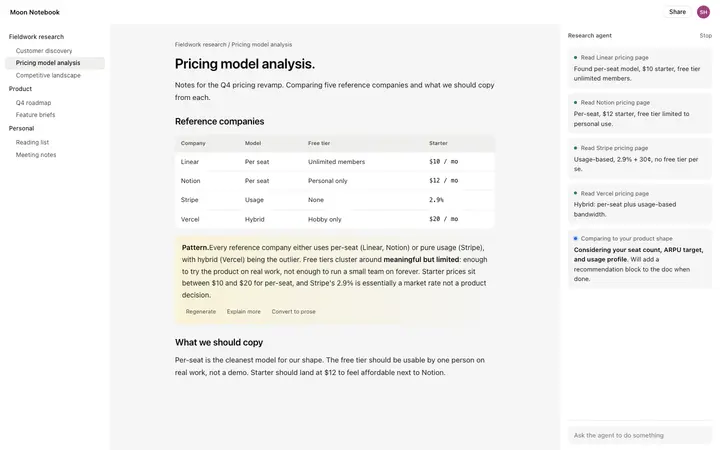
AI writing dashboard template for SaaS documentation tools, note apps, and editors with an AI assistant. Use it as the main working screen of a writing product, where the document and the assistant share the same view. Use this AI template with Claude Code, Replit, Lovable, ChatGPT Codex, Bolt, Cursor, or another coding tool.
About this vibe coding template
AI writing dashboard template for products people write inside all day. Made for SaaS documentation platforms, note taking apps, company wikis, collaborative editors and AI writing assistants. Use it as the main working screen, where someone moves between their files, the document itself and an assistant that helps with the draft. It works for teams adding AI to an existing editor, and for new writing products that need the assistant to feel part of the page. Minimal design with glassmorphism.
Build a full documentation site with this template design
A documentation site is dozens of guides and API reference pages that developers move between constantly, so one documentation template can set the standard for every docs page after it. Copy the template, paste it into Claude Code, Replit, Lovable, ChatGPT Codex, Bolt, or Cursor, and send this alongside it.
Paste into Claude Code, Replit, Lovable, Bolt, or Cursor
Common questions about this template
Which products suit a writing dashboard?
Documentation platforms, note taking apps, company wikis and collaborative editors. It fits any product where the document is the main object on screen.
Where should an AI assistant sit in a writing tool?
Beside the document, keeping the text visible. Writers need to see their own work while the assistant suggests, and anything covering the text gets closed.
How much should an AI writing dashboard template show at once?
Files, the document and the assistant, and little else. Writing products lose people by filling the screen with controls that pull attention from the sentence being written.
Which vibe coding tools work with this dashboard template?
It works in Claude Code, Replit, Lovable, ChatGPT Codex, Bolt and Cursor. Paste it in, describe the data you want shown, and your AI coding tool will connect it to your own source.
How do I build a full SaaS app or admin dashboard with this template?
Paste the coding template into Claude Code, Replit, Lovable, ChatGPT Codex, Bolt, or Cursor with the instruction above, then ask for the next page. The template holds its buttons, cards, and spacing across every screen, so your SaaS app or admin dashboard stays consistent across the whole build.
Use this AI coding template for
- ·Writing dashboard for a docs or company wiki product
- ·Editor screen for an AI writing assistant
- ·Workspace for a collaborative note taking app
- ·Vibe coding writing dashboard template for SaaS
Works with every vibe coding tool
More from the Industry dashboard set
10 templates
More SaaS templates
View all

More vibe coding dashboard templates
View all

Other templates you might like