Maintenance page template for SaaS apps
Maintenance page template for SaaS apps and developer tools. The footer links to the status page. Use this AI template with Claude Code, Replit, Lovable, ChatGPT Codex, Bolt, Cursor, or another coding tool.
What is included in this SaaS template
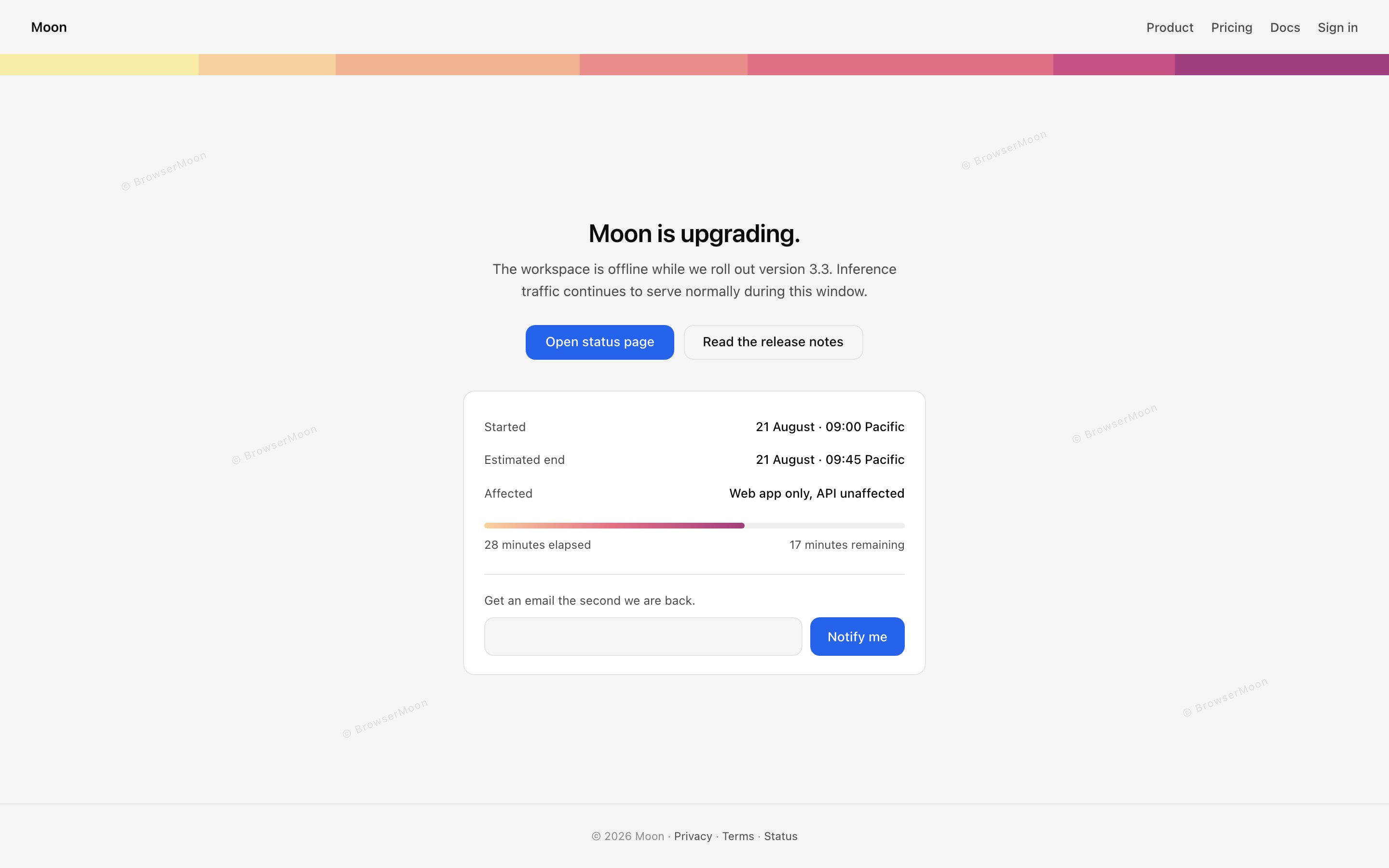
Maintenance page template for SaaS apps and developer tools. The heading announces the maintenance or upgrade. A short paragraph explains which parts of the product are offline during the maintenance window and which continue to serve normally. The form is a single email input and a submit button with a clear call to action label. The footer links to the status page, privacy policy, and terms. Use it as the maintenance page or under construction page for any SaaS app, developer tool, or API platform during scheduled downtime. Minimal design. Paste it into Claude Code, Replit, Lovable, ChatGPT Codex, Bolt, or Cursor and describe the maintenance window times, the affected scope, and the notification form handler you want.
Build a full set of SaaS error and status pages with Lovable, Cursor, or Claude Code
A SaaS product needs a 404 page, a 500 error page, and an uptime status page matching the main product, so one status page template anchors every error screen that follows. Copy this template, paste it into Lovable, Bolt, Cursor, Claude Code, Replit, ChatGPT Codex, Google Antigravity, or any AI coding tool, and send this prompt with it.
Paste into Lovable, Bolt, Cursor, Claude Code, Codex, Antigravity, or any AI coding tool
DESIGN.md file for Claude Code, Cursor, and Lovable
The colors, typography, and UI components of this template as a DESIGN.md file, the open format AI coding tools read. Drop it in your project root and point Claude Code, Cursor, Lovable, Bolt, Codex, Antigravity, or any AI coding tool to it, or import it into Google Stitch.
DESIGN.md--- version: alpha name: "Maintenance page" colors: primary: "#004FFF" on-primary: "#FFFFFF" neutral: "#F5F5F5" on-surface: "#0A0A0A" on-surface-muted: "#4A4A4A" surface: "#FFFFFF" secondary: "#F8D2A0"
Not sure this template fits?Ask Mon, your free AI designer.
Ask Mon, our free AI designer, how to adapt Maintenance page template for SaaS apps for higher signups, free trials, and sales.
3D launch videos, mockups, and conversion guides
Questions about this SaaS template
What does this maintenance page template include?
A heading announcing the maintenance, a paragraph naming what is offline and what continues to serve normally, a status page button and a release notes button, a maintenance window block with start time, estimated end time, and affected scope, a progress bar with elapsed and remaining time labels, and an email notification form for visitors who want to be alerted when the product comes back.
How does the progress bar work in this SaaS maintenance page template?
The progress bar fills proportionally to how far through the scheduled maintenance window the product is. A label on the left shows the elapsed time and a label on the right shows the remaining time. Set the bar fill and the two time labels from your deployment system when the maintenance page goes live, and update them on a timed interval if you want the bar to advance as time passes.
How is a maintenance page template different from a 500 error page template?
A maintenance page shows when downtime is planned and scheduled. The team set the window in advance, knows how long it will last, and can give visitors an accurate end time and scope. A 500 error page shows when something broke unexpectedly on the server. The maintenance page centers communication on the window and progress. The 500 error page centers it on the incident and the team's response.
Which other templates pair with this maintenance page?
The 500 error page and the maintenance page both communicate that the product or a component is currently unavailable. The status page template in the library is the dedicated page where teams publish incident updates, track component uptime, and post maintenance schedules. A product shipping any of these three pages benefits from having all three together.
Which tools work with this maintenance page template?
Claude Code, Replit, Lovable, ChatGPT Codex, Bolt, and Cursor. Paste it in and describe the maintenance window times, the affected scope, and the notification form handler you want.
How do I build a full set of SaaS error and status pages with this template?
Give Claude Code, Replit, Lovable, Bolt, or Cursor this template as the reference design, then ask for each page of your set of SaaS error and status pages one at a time. The tool holds the visual language once it has a finished coding template to work from.
Can I use this template commercially for client projects or SaaS products?
Yes. A one-time BrowserMoon license ($349) unlocks all 730+ website and mobile app UI templates for unlimited personal, commercial, and client projects, including their animations, visuals, and gradients. It is lifetime access with no subscription, no attribution required, and no per-project fee. You cannot resell or redistribute the templates as a template pack. See the template license.


