AI chatbot UI template for SaaS apps
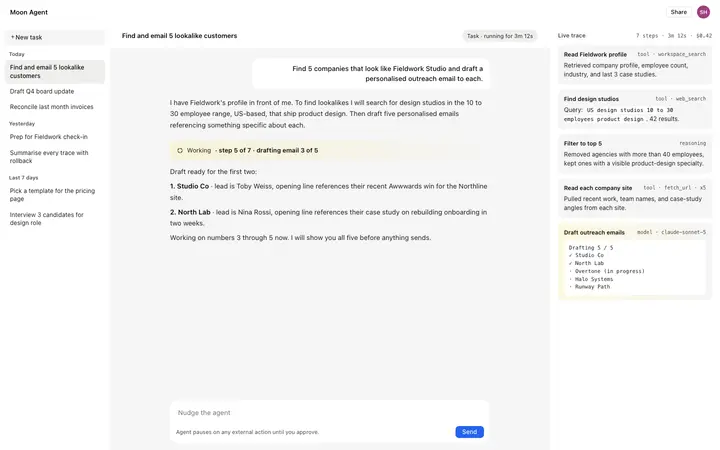
AI chatbot UI template for SaaS products built around a conversation: assistants, copilots, and support bots. It covers the signed in dashboard, with a chat thread, a composer, conversation history, and bot settings. Use this AI template with Claude Code, Replit, Lovable, ChatGPT Codex, Bolt, Cursor, or another coding tool.
About this vibe coding template
Interactive AI chatbot UI for vibe coding and SaaS builders. This is the interface for building an AI chatbot product, not the chatbot itself. Paste it in and describe the chat behaviour, the history sidebar, and the settings your product exposes. Swap the copy and the images for your own and the page is ready to ship.
Build a full AI chat product or AI SaaS app with this template design
An AI chat product repeats one surface at different sizes, from a full chat interface to a chat widget and a copilot panel, so one AI chat template can set the standard for every screen after it. Copy the template, paste it into Claude Code, Replit, Lovable, ChatGPT Codex, Bolt, or Cursor, and send this alongside it.
Paste into Claude Code, Replit, Lovable, Bolt, or Cursor
Common questions about this template
What is an AI chatbot UI?
The interface for building an AI chatbot SaaS product. This template covers the dashboard: a chat thread, a message composer, a conversation history sidebar, and a settings panel for bot configuration. It is a starting point for building the product, not a finished chatbot.
What should an AI chatbot dashboard include?
A message thread where the conversation happens, a composer with a send button, a history sidebar that shows past sessions, and a settings area for the system prompt and model. Those four surfaces cover the core chatbot interface.
What vibe coding tools work with this AI chatbot UI?
It works with Claude Code, Replit, Lovable, ChatGPT Codex, Bolt, and Cursor. Paste it in and describe the chat behaviour, history, and settings your product needs.
Is this template interactive?
Yes. The template includes an active chat thread with hover states on messages and an interactive composer, so you can test the UI behaviour before connecting it to a real model API.
Use this AI coding template for
- ·AI chatbot UI template for building a SaaS chatbot or conversational AI product
- ·Interactive chat dashboard with a message thread, history sidebar, and bot settings panel
- ·SaaS UI for an AI chat product with conversation management and composer interface
- ·Vibe coding starting point for an AI chatbot, assistant, or customer support product
Works with every vibe coding tool
More from the AI tool interface set
All 15 templates
More dashboard templates
View all
More vibe coding SaaS templates
View all

Other templates you might like