Feature discovery cards template for SaaS
Interactive feature discovery cards template for SaaS dashboards. Drives feature adoption without gating access or interrupting the current task. Use this AI template with Claude Code, Replit, Lovable, ChatGPT Codex, Bolt, Cursor, or another coding tool.
More from the Product onboarding set 5 matching templates

What is included in this SaaS template
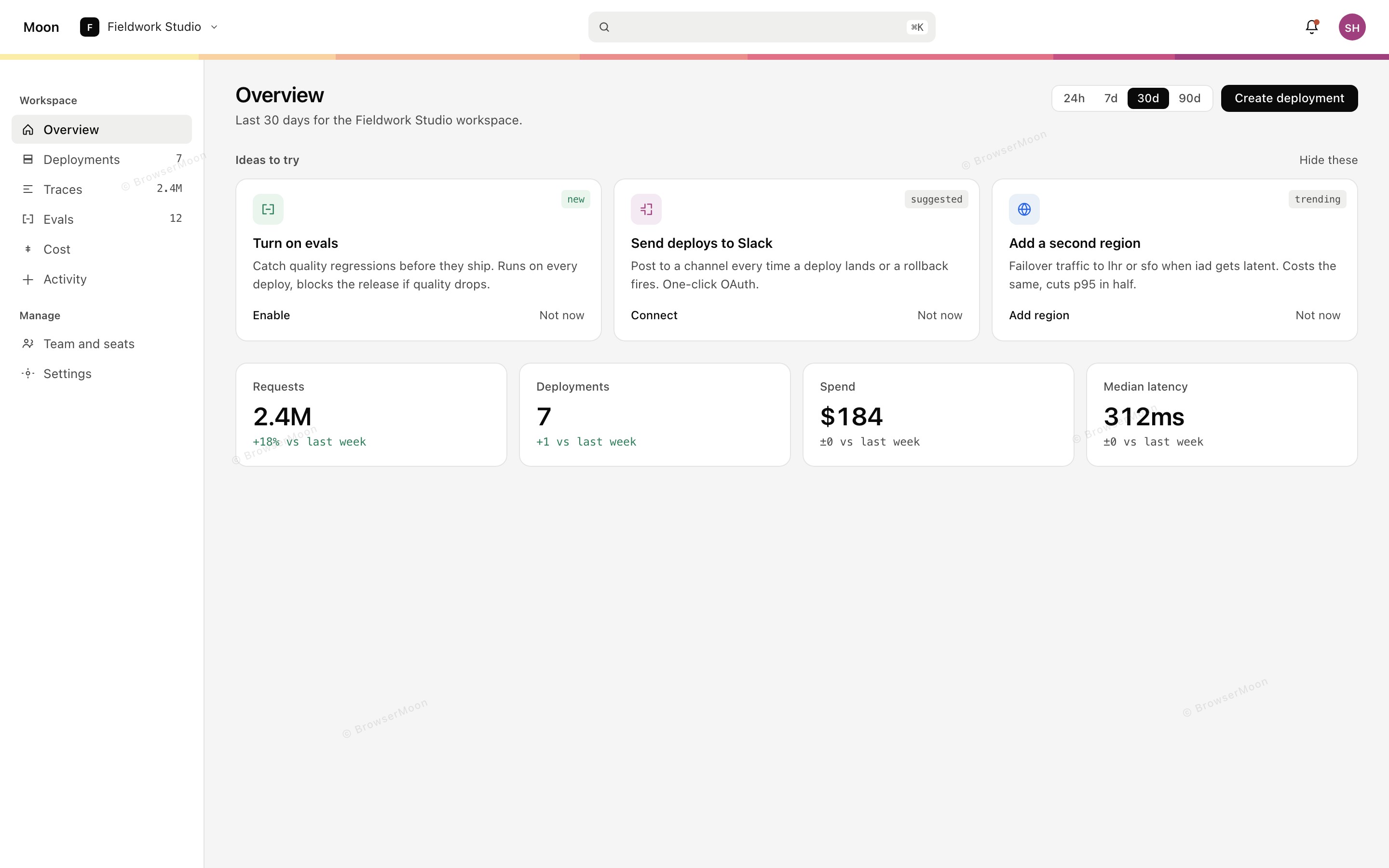
Interactive feature discovery cards template for SaaS dashboards and developer tools. The section has a heading and a hide link so teams can remove it when they are not interested. Three feature discovery cards sit in a row below the heading. Cards have a subtle border and a hover transition. The nudge approach surfaces features contextually on the dashboard without forcing the user through an onboarding modal or requiring them to find the feature by navigating to settings. Use it as the feature discovery section for any SaaS dashboard, developer tool, or admin interface where teams regularly miss high value features. Minimal design. Paste it into Claude Code, Replit, Lovable, ChatGPT Codex, Bolt, or Cursor and replace the three card titles, badge labels, icons, descriptions, and action links with the features you want to surface.
Build a full SaaS onboarding flow with Lovable, Cursor, or Claude Code
A SaaS onboarding flow guides new signups through welcome, workspace setup, and activation steps, so one onboarding template anchors every activation screen that follows. Copy this template, paste it into Lovable, Bolt, Cursor, Claude Code, Replit, ChatGPT Codex, Google Antigravity, or any AI coding tool, and send this prompt with it.
Paste into Lovable, Bolt, Cursor, Claude Code, Codex, Antigravity, or any AI coding tool
DESIGN.md file for Claude Code, Cursor, and Lovable
The colors, typography, and UI components of this template as a DESIGN.md file, the open format AI coding tools read. Drop it in your project root and point Claude Code, Cursor, Lovable, Bolt, Codex, Antigravity, or any AI coding tool to it, or import it into Google Stitch.
DESIGN.md--- version: alpha name: "Feature discovery cards" colors: primary: "#0A0A0A" on-primary: "#FFFFFF" neutral: "#F5F5F5" on-surface: "#0A0A0A" on-surface-muted: "#4A4A4A" surface: "#FFFFFF" secondary: "#A03F7E"
Not sure this template fits?Ask Mon, your free AI designer.
Ask Mon, our free AI designer, how to adapt Feature discovery cards template for SaaS for higher signups, free trials, and sales.
3D launch videos, mockups, and conversion guides
Questions about this SaaS template
What does this feature discovery cards template include?
A section heading with a hide link, three feature discovery cards each with a corner badge (new, suggested, or trending), a category icon, a short feature headline, a two sentence description of the feature and its benefit, and two action links: one to enable or connect and one to dismiss the card.
How is a feature discovery template different from a SaaS onboarding modal?
An onboarding modal interrupts the current task with a full screen overlay that requires a response before the user can continue. A nudge card lives on the dashboard as an ambient suggestion the user can act on or dismiss at their own pace. Nudge cards drive feature adoption without blocking the user's current process.
How do the badge labels work in this card template?
Each card has one badge: new for recently shipped features, suggested for features the system has determined would benefit the user based on current usage patterns, and trending for features that a large share of users on similar plans have recently enabled. Replace the badge labels with whatever classification system your product uses for surfacing relevant features.
What happens when a user dismisses this SaaS discovery template?
The Not now link dismisses that specific card from the user's view. Implement the dismiss behavior in your own frontend state: hide the card for the session, suppress it for a set number of days, or remove it permanently after multiple dismissals. The card level dismiss is more effective than a section level hide because it lets the user act on one nudge while removing another.
Which tools work with this feature discovery cards template?
Claude Code, Replit, Lovable, ChatGPT Codex, Bolt, and Cursor. Paste it in and replace the three card titles, badge labels, icons, descriptions, and action links with the features you want to surface.
How do I build a full SaaS onboarding flow with this template?
Give Claude Code, Replit, Lovable, Bolt, or Cursor this template as the reference design, then ask for each page of your SaaS onboarding flow one at a time. The tool holds the visual language once it has a finished coding template to work from.
Can I use this template commercially for client projects or SaaS products?
Yes. A one-time BrowserMoon license ($349) unlocks all 730+ website and mobile app UI templates for unlimited personal, commercial, and client projects, including their animations, visuals, and gradients. It is lifetime access with no subscription, no attribution required, and no per-project fee. You cannot resell or redistribute the templates as a template pack. See the template license.


