Activity feed template for SaaS dashboards
Activity feed template for SaaS dashboards, workspace tools, and products that need an audit trail. Use it wherever a team needs to see what changed, when, and who did it. Use this AI template with Claude Code, Replit, Lovable, ChatGPT Codex, Bolt, Cursor, or another coding tool.
About this vibe coding template
Activity feed template for products that owe their customers a record. It fits SaaS workspaces, admin tools, developer platforms, security products, and anything sold to a team that will eventually ask what happened. Use it as the log inside the product. An audit trail is the feature nobody asks about until something goes wrong, and then it is the only one that matters. Minimal design. It works in Claude Code, Replit, Lovable, ChatGPT Codex, Bolt, and Cursor.
Build a full SaaS app or admin dashboard with this template design
A SaaS app or admin dashboard is dozens of screens sharing one shell, so one dashboard template can set the standard for the navigation, the spacing, and the card design on every screen after it. Copy the template, paste it into Claude Code, Replit, Lovable, ChatGPT Codex, Bolt, or Cursor, and send this alongside it.
Paste into Claude Code, Replit, Lovable, Bolt, or Cursor
Common questions about this template
What does this activity feed template include?
A page header with an event count and date range picker, a filter chip row for narrowing by event type with per type counts, grouped by day event rows with actor avatars, plain text action descriptions, optional secondary context lines, and relative or absolute timestamps, and an export button.
How is an activity feed template different from an audit log in a SaaS app?
An activity feed shows recent workspace events to team members so they can follow what is happening: who deployed what, who was invited, what was renamed. An audit log is the same data presented for compliance or security review, with export capability and longer date ranges. This template supports both: use the filter chips and relative timestamps for the activity feed view, and the export button and all time range for the audit log view.
How do the filter chips work in this dashboard template?
Each chip shows the event category label and the count of events in that category for the selected date range. Clicking a chip filters the feed to show only that event type and fills the chip with a solid background. Replace the category labels and their counts with the event types in your own product.
Which dashboard template pairs with this activity feed?
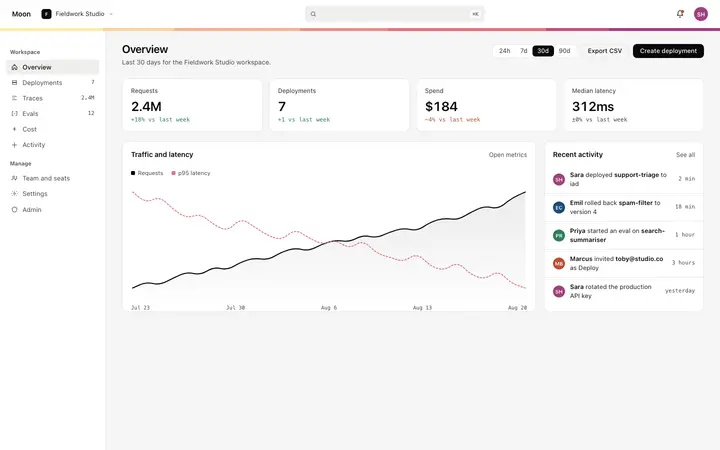
The dashboard overview includes a compact recent activity strip showing the five most recent workspace events. This activity feed template is the full page version that a user reaches by clicking the see all link on the overview.
Which tools work with this activity feed template?
Claude Code, Replit, Lovable, ChatGPT Codex, Bolt, and Cursor. Paste it in and replace the event type chips and the feed rows with your own event taxonomy and data.
How do I build a full SaaS app or admin dashboard with this template?
Paste the coding template into Claude Code, Replit, Lovable, ChatGPT Codex, Bolt, or Cursor with the instruction above, then ask for the next page. The template holds its buttons, cards, and spacing across every screen, so your SaaS app or admin dashboard stays consistent across the whole build.
Use this AI coding template for
- ·Activity log and audit log template for a SaaS dashboard
- ·Activity feed with filter chips and grouped event rows for a SaaS workspace
- ·Workspace audit trail template for a SaaS product or developer tool
- ·Vibe coding activity log template
Works with every vibe coding tool
More from the SaaS dashboard set
5 pages
More dashboard templates
View all
More vibe coding SaaS templates
View all
Other templates you might like