A DESIGN.md file tells an AI coding tool what your design looks like: your colours, fonts, sizes, corner radii and spacing, plus a few plain rules. It is an open format from Google, made for its Stitch design tool, and it works as context for Claude Code, Cursor and other AI coding tools too. Below is a complete real DESIGN.md example, explained line by line, two shorter examples in other styles, and how to write and use your own.
Quick answer: a DESIGN.md has two parts. The top, between two --- lines, is the design tokens: colours, typography, radii, spacing and components. The rest is plain Markdown that explains how to use them. Save it as DESIGN.md in the root of your project and tell your AI tool to follow it.
A complete DESIGN.md example
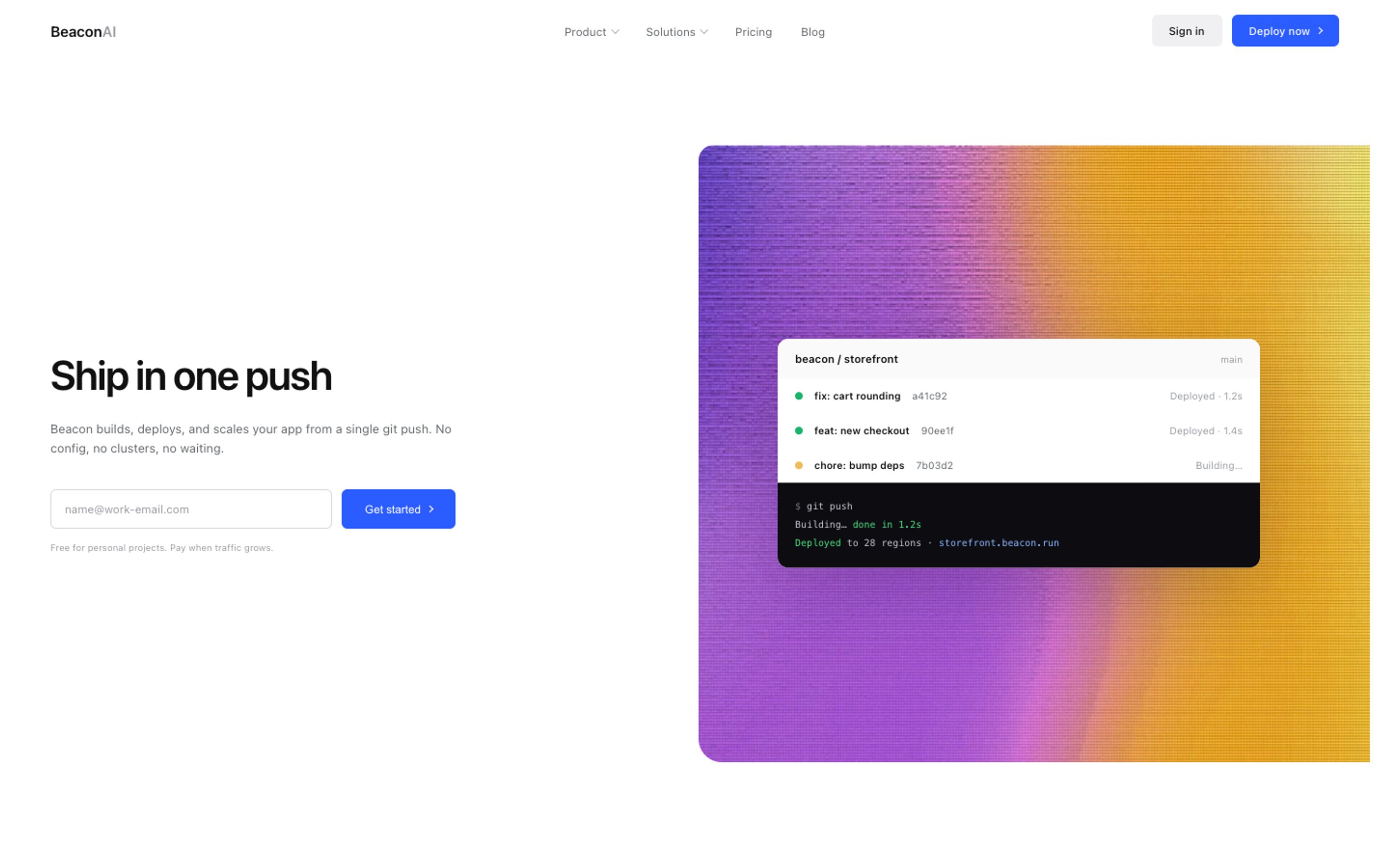
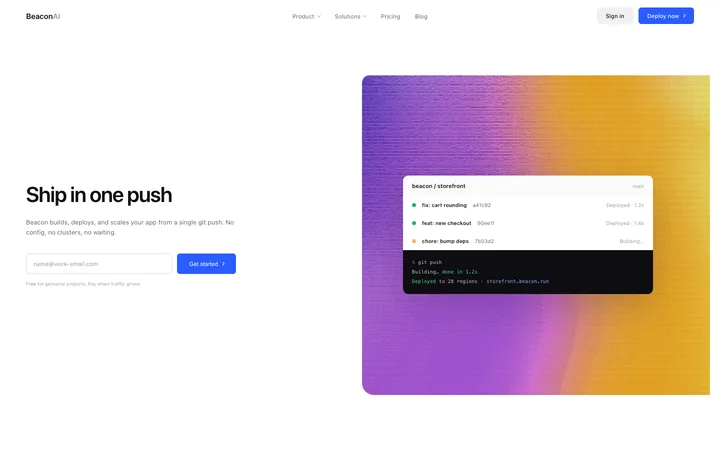
This is the full file for a light developer tools landing page, the kind of page a hosting or deployment product would use. It comes from our developer tools landing page template.
---
version: alpha
name: "Developer tools SaaS landing page for hosting"
description: "Developer tools SaaS landing page template for hosting, deployment, and CI/CD products."
colors:
  primary: "#2B5CFF"
  on-primary: "#FFFFFF"
  neutral: "#FFFFFF"
  on-surface: "#111111"
  on-surface-muted: "#9A9CA1"
  surface: "#F7F7F8"
  secondary: "#0A2540"
typography:
  display:
    fontFamily: "Inter"
    fontSize: 46.8px
    fontWeight: 600
    lineHeight: 1.1
    letterSpacing: -0.035em
  headline:
    fontFamily: "Inter"
    fontSize: 34px
    fontWeight: 600
    lineHeight: 1.2
  body-md:
    fontFamily: "Inter"
    fontSize: 13.5px
    fontWeight: 400
    lineHeight: 1.6
  label-sm:
    fontFamily: "Inter"
    fontSize: 12.5px
    fontWeight: 500
    lineHeight: 1.4
rounded:
  sm: 10px
  md: 12px
  lg: 14px
  xl: 16px
spacing:
  xs: 8px
  sm: 12px
  md: 20px
  lg: 24px
  xl: 28px
  2xl: 32px
components:
  button-primary:
    backgroundColor: "{colors.primary}"
    textColor: "{colors.on-primary}"
    typography: "{typography.label-sm}"
    rounded: "{rounded.xl}"
  card:
    backgroundColor: "{colors.surface}"
    textColor: "{colors.on-surface}"
    rounded: "{rounded.md}"
---

## Overview

Developer tools SaaS landing page template for hosting, deployment, and CI/CD products. It shows a git push turning into a live URL, preview deployments, a workflow section, logos, testimonials, and usage based pricing. Use this AI template with Claude Code, Replit, Lovable, ChatGPT Codex, Bolt, Cursor, or another coding tool.

This file describes the design of the BrowserMoon template "Developer tools SaaS landing page for hosting" so an AI coding agent can build new pages that match it. It is a light design. Tags: Landing pages, Hero, Navigation, Features, CTA, Logos, Testimonials, SaaS, Pricing, Dark mode, Documentation.

## Colors

- **Primary (#2B5CFF)**: the accent. Use it for the main call to action and key highlights only.
- **Neutral (#FFFFFF)**: the page background.
- **On surface (#111111)**: headings and body text.
- **On surface muted (#9A9CA1)**: secondary text, captions and labels.
- **Surface (#F7F7F8)**: cards and raised areas.
- **Secondary (#0A2540)**: a second accent, used sparingly.

## Typography

Headings use Inter at weight 600 with -0.035em letter spacing; body text uses Inter at 13.5px with a line height of 1.6. The display size is 46.8px. Keep this scale and do not add new font families.

## Layout

Spacing follows a scale of 8px, 12px, 20px, 24px, 28px, 32px. Use these values for padding, margins and gaps instead of new ones, and keep the generous space between sections.

## Elevation & Depth

The design uses soft shadows to lift cards and controls. Keep shadows subtle and consistent; do not add heavier ones.

## Shapes

Corner radii are 10px, 12px, 14px, 16px. Reuse them; do not mix in new radii.

## Components

- **Primary button**: primary background, label-sm type, the largest corner radius in the scale.
- **Cards**: surface background, on-surface text, the medium radius.
- Reuse one button and one card style everywhere rather than creating variants.

## Do's and Don'ts

- Do use the primary colour only for actions and key highlights.
- Do keep the type scale, spacing scale and radii from this file.
- Do keep body text at 13.5px or larger on phones.
- Don't add new fonts, colours, gradients or shadows that are not in this file.
- Don't centre long paragraphs; keep text left aligned for reading.
The DESIGN.md example explained
version, name and description. The format is still in alpha, so the version says alpha. The name and description tell the AI what kind of page this is.
colors. Seven named colours. primary is the accent for buttons, neutral is the page background, on-surface is the text and surface is the card colour. Naming colours by job rather than by hue is what lets an AI use them correctly on a page it has never seen.
typography. Four text styles from biggest to smallest: display, headline, body and label. Each one has a font, size, weight and line height. This is the part that stops an AI from inventing new font sizes on every page.
rounded and spacing. The corner radii and the spacing scale. If every gap on the page comes from this list, the design stays consistent.
components. Small recipes that point back to the tokens, like a primary button that uses the primary colour and the largest radius. The {colors.primary} style references keep everything in one place.
The Markdown sections. Overview, Colors, Typography, Layout, Elevation, Shapes, Components and Do's and Don'ts. These are written for the AI in plain words. The Don'ts are often the most useful lines: "Don't add new fonts, colours, gradients or shadows" prevents most of the drift you see in AI built pages.
420+ of our design templates come with their own DESIGN.md file, ready for Claude Code, Cursor, Stitch and Antigravity.
Get a licenceDESIGN.md example: dark fintech
A dark hero for a bank or money app, from our fintech hero section. Note the green primary and white text on near black.
---
version: alpha
name: "Fintech hero section for SaaS"
description: "Fintech hero section for a neobank, banking app or SaaS money product."
colors:
  primary: "#1D6B47"
  on-primary: "#FFFFFF"
  neutral: "#141414"
  on-surface: "#FFFFFF"
  on-surface-muted: "#55555A"
typography:
  display:
    fontFamily: "SF Pro Text"
    fontSize: 72px
    fontWeight: 600
    lineHeight: 1.1
  headline:
    fontFamily: "SF Pro Text"
    fontSize: 30px
    fontWeight: 600
    lineHeight: 1.2
  body-md:
    fontFamily: "SF Pro Text"
    fontSize: 15px
    fontWeight: 400
    lineHeight: 1.6
  label-sm:
    fontFamily: "SF Pro Text"
    fontSize: 14px
    fontWeight: 500
    lineHeight: 1.4
…
DESIGN.md example: ecommerce
A light online store homepage, from our ecommerce homepage template. The type is smaller and calmer, so the product photos do the talking.
---
version: alpha
name: "Ecommerce homepage"
description: "Ecommerce homepage template with a full bleed hero, bestseller product grid, and lifestyle editorial sections."
colors:
  primary: "#004FFF"
  on-primary: "#FFFFFF"
  neutral: "#FFFFFF"
  on-surface: "#0A0A0A"
  on-surface-muted: "#5A5550"
  surface: "#F5F5F5"
  secondary: "#003ACC"
typography:
  display:
    fontFamily: "Inter"
    fontSize: 28px
    fontWeight: 400
    lineHeight: 1.1
    letterSpacing: -0.008em
  body-md:
    fontFamily: "Inter"
    fontSize: 14px
    fontWeight: 400
    lineHeight: 1.5
  label-sm:
    fontFamily: "Inter"
    fontSize: 13px
    fontWeight: 500
    lineHeight: 1.4
…
How to write your own DESIGN.md
1. Start from a design you like. A template, your current site or a screenshot. You need real values, not a mood.
2. Pick five to seven colours and name them by job: primary, on-primary, background, text, muted text, surface, and one second accent if you need it.
3. Write four text styles: display, headline, body and label, with font, size, weight and line height.
4. Add your radii and spacing scale. Measure them from the design and round to a clean scale.
5. Write the Do's and Don'ts. The rules you keep repeating to your AI tool belong here.
Google publishes the format and a command line tool that checks your file, including colour contrast. Our DESIGN.md page explains the format in more depth, and 12 example files are on GitHub in design-md-examples.
How to use DESIGN.md with AI coding tools
Google Stitch: the tool the format was made for. See our Google Stitch templates.
Claude Code: save DESIGN.md in your project and add a line to CLAUDE.md that says to follow it for all UI work. See our Claude Code templates and the CLAUDE.md generator.
Cursor: save it in the project and reference it from a Cursor rule so every request reads it. See Cursor templates.
Antigravity and Kiro: keep it in the project root and point to it in your instructions. See Antigravity templates and Kiro templates.
In every tool the prompt is the same: "Follow DESIGN.md for colours, type, spacing and radii. Do not add anything that is not in it."
Frequently asked questions
What is a DESIGN.md file?
A Markdown file that describes a design for AI coding tools: design tokens like colours, fonts, radii and spacing at the top, and plain rules for using them below. It is an open format from Google.
Where do I put DESIGN.md?
In the root of your project, next to your README. Then tell your AI tool to follow it, for example from CLAUDE.md or a Cursor rule.
Does DESIGN.md work with Claude Code and Cursor?
Yes. It was made for Google Stitch, but any AI coding tool can read it as context. Point the tool to the file in your instructions.
Is DESIGN.md the same as CLAUDE.md?
No. CLAUDE.md holds instructions for Claude Code about your whole project. DESIGN.md only describes your design. Many projects use both, with CLAUDE.md pointing to DESIGN.md.
Where can I get DESIGN.md examples?
This page has three real examples. Over 420 BrowserMoon templates include their own DESIGN.md file that matches the template's design.
Related templates
DESIGN.md
The format and files for 420+ templates.
Google Stitch templates
Designs with DESIGN.md for Stitch.
Claude Code templates
Designs set up for Claude Code.
CLAUDE.md vs AGENTS.md vs Cursor rules
Which instruction file does what.
Design system for vibe coding
Keep AI built pages consistent.
Website design ideas
Real designs by page and section.