App home screen with dashboard card template
An app home screen for iOS and Android with a dark gradient summary card, a recent activity list, and a bottom tab bar. The hero card shows a key metric with a green trend badge. Use it as the main home screen for productivity apps, project tools, fitness trackers, and any mobile product that shows personalised data after sign-in. Built for Bolt, Lovable, and Replit.
About this app template
The home screen is the screen users see most. It needs to show the right information at a glance and make the next action obvious. This template opens with a greeting and the user's name, then a dark gradient hero card with a large metric, a supporting line, and a green trend badge. Below, a Recent section lists three items with colour-coded icons, titles, subtitles, and timestamps. A four-tab bottom navigation bar sits at the bottom with Home active in blue. Paste it into Bolt, Lovable, or Replit, update the metric to the number that matters most in your app, swap the list items for real data from your backend, and ask your AI to wire the tab bar navigation.
Build a full mobile app with this template design
A home screen carries the type scale, spacing, and card style a user sees more than any other surface, so it can set the standard for every screen after it. Copy the template, paste it into Claude Code, Replit, Lovable, ChatGPT Codex, Bolt, or Cursor, and send this alongside it.
Paste into Claude Code, Replit, Lovable, Bolt, or Cursor
Common questions about this template
How do I replace the metric in the hero card with real data?
Paste this template into Bolt, Lovable, or Replit and tell your AI what number to show and where it comes from. Your AI fetches the value from your backend or database and renders it in the hero card when the screen loads.
How do I wire up the tab bar navigation?
Ask your AI to build a screen for each tab and connect the tab bar icons to the correct screen. In React Native or Flutter, each tab becomes a screen in a bottom tab navigator. Your AI handles the routing once you describe what each tab should show.
Can I replace the list with a feed of posts or cards?
Yes. Ask your AI to replace the recent items list with a scrollable feed of cards, posts, or any content type. The list layout is a starting point. Your AI adapts it to whatever data structure your app uses.
How do I personalise the greeting with the user's real name?
Paste the template into your AI tool and ask it to replace the hardcoded name with the authenticated user's display name from your auth provider. Supabase, Clerk, and Firebase all expose the user's name in the session object.
Use this template for
- ·Home and dashboard screens for iOS and Android apps
- ·Post-login main screens for productivity and project tools
- ·Activity feed and recent history screens
- ·Data summary screens for fitness, finance, and analytics apps
More home app templates
View all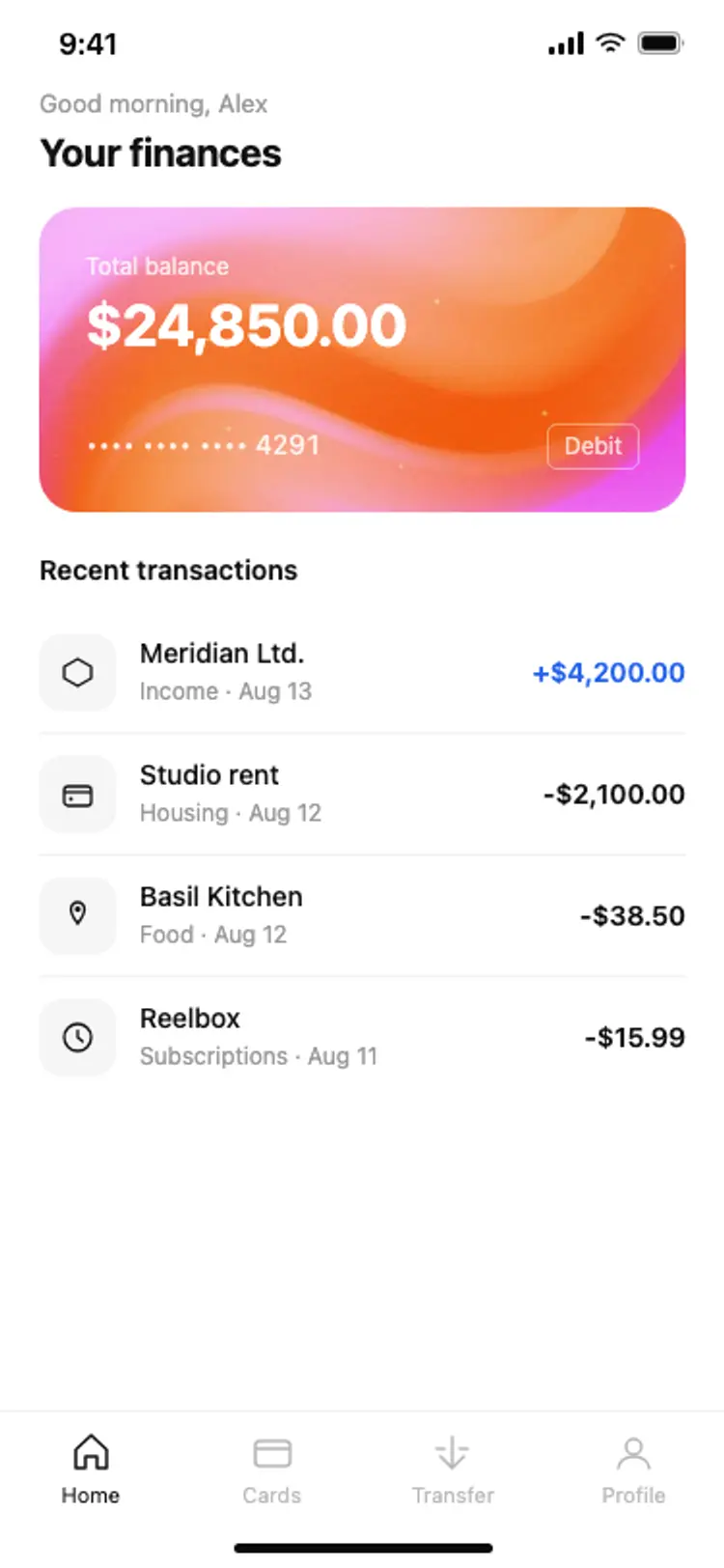
Other app templates you might like

See also
Browse app templates