Social feed home screen app template
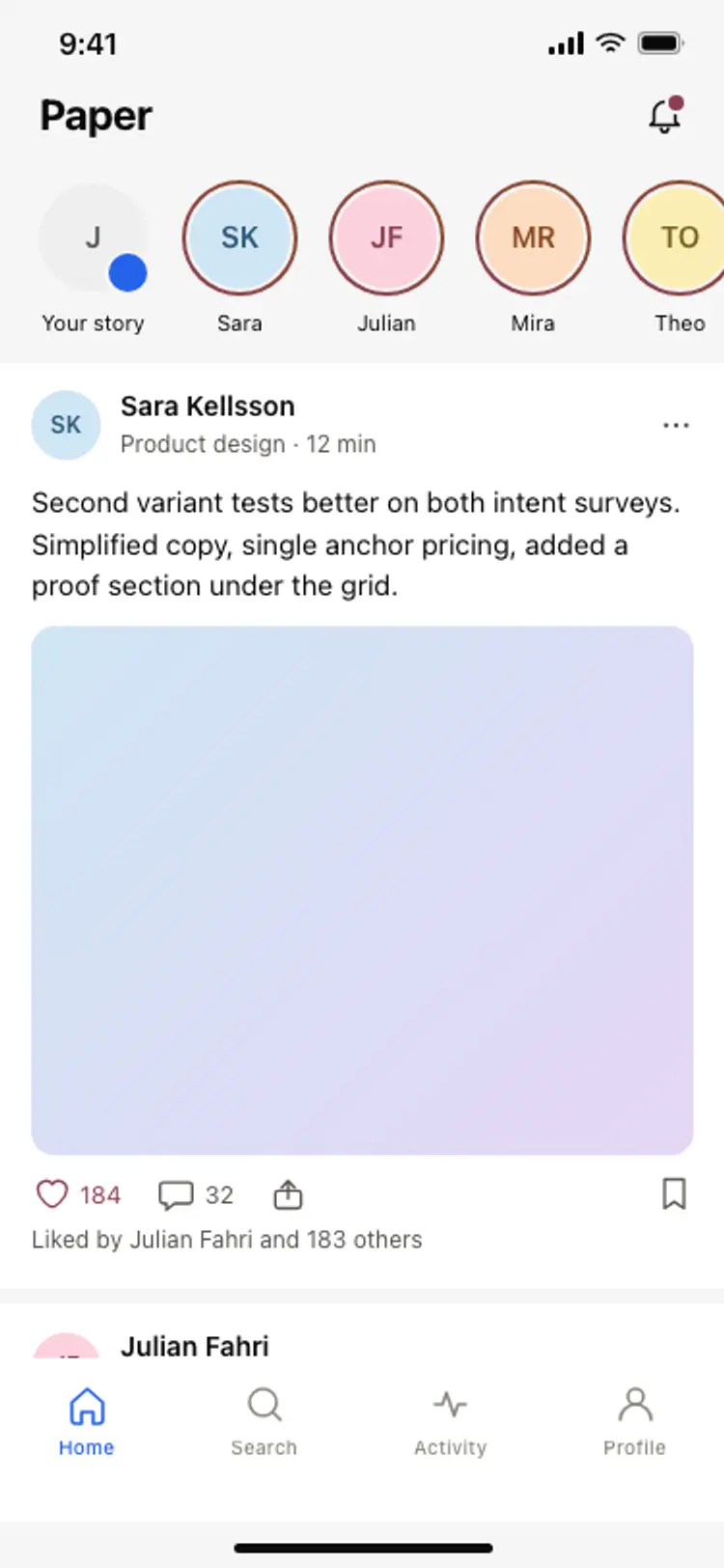
A social media app home screen for iOS and Android. Story row with active blue rings and a seen state, a post card below with a gradient image placeholder, like and comment counts, and a bottom tab bar with a centred post button. Blue-only palette. Use it for social apps, creator platforms, and community tools built with Bolt, Lovable, and Replit.
About this app template
The home feed is the screen social app users spend the most time on. This template gives you the full stack. A topbar with the app logo and notification bell sits at the top, a horizontal story row below it shows five users with blue ring indicators for unseen stories and a grey ring for seen ones. Below, a post card shows the author avatar, name, handle, timestamp, a gradient image placeholder, like count in blue, comment count in grey, and a share icon at the right. The caption sits below with the author name bolded. A five-tab bottom bar with a blue Home fill icon and a centred blue post button completes the layout. Paste it into Bolt, Lovable, or Replit and ask your AI to wire the story row, the feed list, and the post button.
Build a full mobile app with this template design
A mobile app is many screens a user moves between quickly, which makes any inconsistency obvious, so one screen can set the standard for every screen after it. Copy the template, paste it into Claude Code, Replit, Lovable, ChatGPT Codex, Bolt, or Cursor, and send this alongside it.
Paste into Claude Code, Replit, Lovable, Bolt, or Cursor
Common questions about this template
How do I load real posts and stories into this feed?
Paste this template into Bolt, Lovable, or Replit and ask your AI to fetch posts and story data from your Supabase or Firebase database. Your AI maps each post to a card and each user to a story ring, swapping placeholders for real avatars and images.
How do I add infinite scroll to the social feed?
Ask your AI to wrap the post list in a flat list component with an onEndReached handler that fetches the next page of posts. In React Native use FlatList, in Flutter use ListView.builder with a scroll controller.
How do I make the like button toggle on tap?
Ask your AI to add a tap handler on the heart icon that toggles a liked state in local component state, animates the icon fill from white to blue, and sends an optimistic update to your backend to increment the like count.
Can I use this layout for a private community rather than a public feed?
Yes. Remove the story row or replace it with a members row. Gate the feed behind authentication so only community members see posts. Ask your AI to filter the feed query by group membership.
Use this template for
- ·Social media app home feed screens for iOS and Android
- ·Creator and community platform feed layouts
- ·Story and post feed screens for consumer social apps
- ·Activity feed home screens for niche social networks
More from the Social app set
All 5 screens
More social app templates
View all
Other app templates you might like

See also
Browse app templates